








Austrian special sections
without stopping!
Activate the FLEX service and use the fast lane at ASFINAG toll gates – you’ll be charged automatically after your trip.
Works on all ASFINAG special sections

What is FLEX?
FLEX is an Austrian electronic section toll that is settled automatically after passing the toll gates on six special sections: S16 Arlberg, A13 Brenner, A10 Tauern, A11 Karawanken, A9 Bosruck and A9 Gleinalm. Activating the service is very simple. Just add your vehicle’s licence plate number and enter the details for your chosen payment method – the rest happens automatically.

Drive without stopping
Use the green lane at toll gates – the barrier (if there is one) will open automatically.

“Drive first, pay later”
The fee is charged automatically from your linked payment method – no stress about fines.

Same price
You’ll pay the same as for single payments (and in total no more than the price of an annual pass).

Full flexibility
Drive any of the sections without worry – the system settles each one automatically.
Where does FLEX work?
The service is available on all ASFINAG special sections. Use the map and list below.
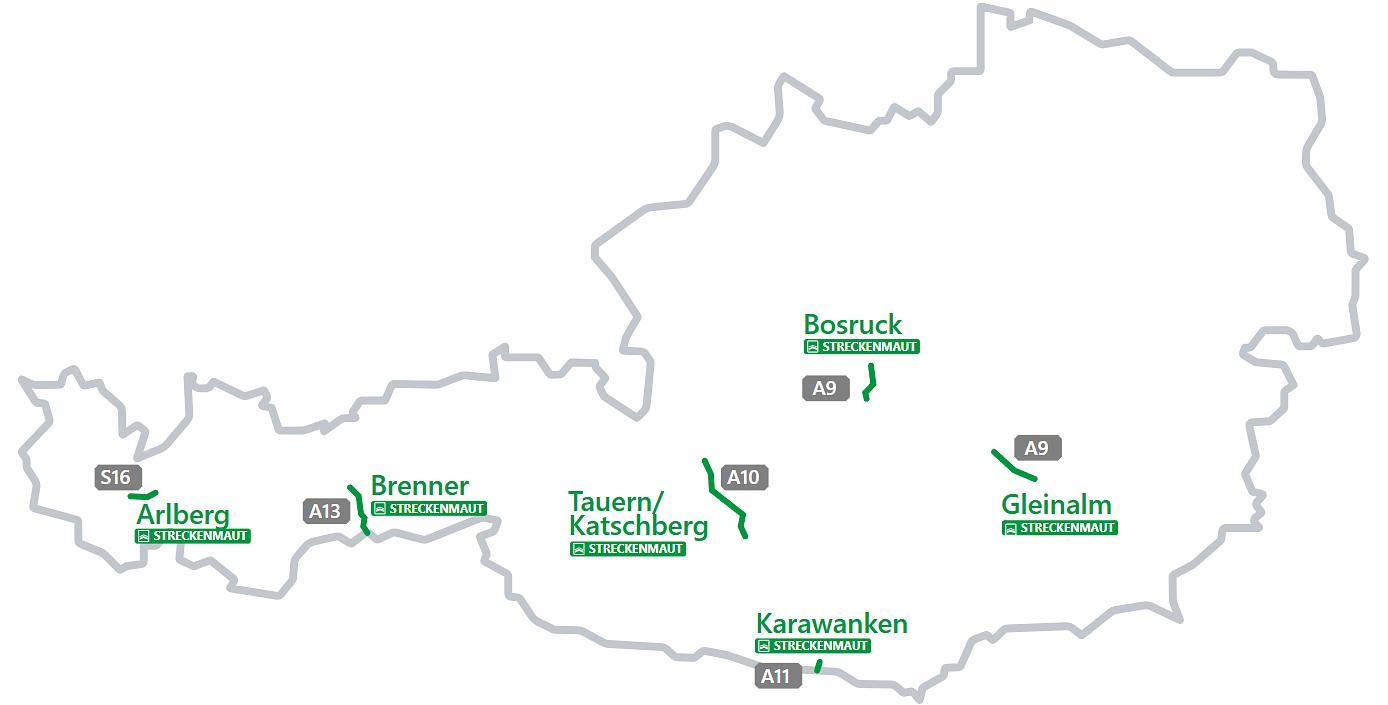
| Section | Stretch | Notes |
|---|---|---|
| A9 Bosruck | Spital/Pyhrn – Ardning | Cost cap equal to pass price |
| A9 Gleinalm | St. Michael – Übelbach | Cost cap equal to pass price |
| A10 Tauern/Katschberg | Flachau – Rennweg | Cost cap equal to pass price |
| A11 Karawanken | St. Jakob and the border (tunnel) | No pass → no cost cap |
| A13 Brenner | Entire A13 motorway | Cost cap equal to pass price |
| S16 Arlberg | St. Anton am Arlberg – Langen am Arlberg | Fast lane without barrier available |
Note!
The FLEX fee is not a vignette. The FLEX system only covers special sections such as tunnels and bridges. On motorways and expressways a valid vignette is still required.
With FLEX you won’t overpay!
FLEX works like a ticket (it automatically charges you for each trip), but at the same time it protects you from overpaying: the total FLEX charges on a given section will not exceed the price of the annual pass for that section. In addition, you don’t risk accidentally entering an additional toll section without having paid for it.
| Type of fee | Description | Example amount |
|---|---|---|
| Single trip | Fee for a one-way tunnel passage | approx. €14.50 |
| 2 trips | Outbound + return | approx. €29 |
| 365-day pass | Unlimited number of trips for one year | approx. €87 |
| FLEX – cost cap | With FLEX you drive as much as you like. Once the total value reaches the price of the annual pass, all further trips are effectively “included”. | max. approx. €87 |
Exception:
On the A11 Karawanken section there is no annual pass, so no cost cap applies. Each trip is charged separately according to the current price.
GO lanes and vehicles under 3,5 t Which toll lanes to avoid?
GO lanes and toll gates are intended for trucks (over 3,5 t). For passenger cars, use the green lanes. Exception: on the A9 and A13 the right GO lane is sometimes open to passenger cars as well – always follow the signage on site.
Motorcycles and cars with trailers What you need to know?
Automatic reading of licence plates on motorcycles and vehicle–trailer combinations can be more difficult (plates at the rear). Choose a lane with staff or use the intercom to give your licence plate number. On the A9 and S16 motorcycles and cars with trailers can use the green lane without a barrier – the fee will be charged as usual.
Who is FLEX for?
For drivers going on holiday
Going skiing, on holiday in the Alps or just passing through to Italy or Slovenia? With FLEX you don’t stand in queues for the ticket office, you don’t look for machines or coins – you drive through the green lane and pay afterwards.
For those who drive several times a year
Do you regularly use A10 Tauern or A13 Brenner? Thanks to the cost cap you won’t pay more in total than the price of the pass for a given section – even if you drive it many times.
For those who don’t want to deal with formalities
Don’t like buying tickets each time and logging into different websites? In Autopay you enable FLEX once, add your car and payment method – then you just drive, and the fees are charged automatically.
For those afraid of fines
Not sure if your route includes an additional toll section, or worried it might change and you’ll accidentally enter a toll section? Install and activate FLEX – fees will be charged automatically if you drive through an additional toll section; if you don’t, no fee will be charged.
How to enable FLEX in the Autopay app?
2. Create an account and enter vehicle details
Create an account or log in.
Add the licence plate number and country of registration of the vehicle you’ll be driving to Austria.
3. Choose a payment method
Link a payment card (Visa, MasterCard) that will be charged after using the section.
4. Activate FLEX
Now just go to the “Austria” section and activate the FLEX – section toll service and you’re done!
From that moment on you can use the green lane, and the fees will be charged automatically after your trip.
Install the Autopay app and activate FLEX
Android

Scan the QR code:

or click the link below to install the app on Android via Google Play:
Apple / iOS

Scan the QR code:

or click the link below to install the app on iOS via the App Store:
FLEX – frequently asked questions
1. Does FLEX work without a vignette?
FLEX is a separate fee that applies only to special sections. On other motorways and expressways you still need a valid vignette, which must be purchased separately.
2. Can I be charged twice?
No. If you already have an active ticket/pass for a given section, the system will use it first – FLEX will not charge a new fee.
3. Are there cost limits?
Yes – for most sections the total amount will not exceed the price of a multi-trip pass (365 days from the first trip). Exception: A11 Karawanken – no pass and no cap.
4. Does FLEX work immediately after activation?
Yes. FLEX works immediately after being enabled in the Autopay app and entering the correct licence plate number and country of registration. There is no need to wait for additional activation.
5. I’m riding a motorcycle – which lane should I use?
Automatic reading of motorcycle plates can be difficult. Use a lane with staff or use the intercom to give your licence plate number. On A9 and S16 motorcycles can use the green lane without a barrier.
6. Can I use the GO lanes?
GO lanes are for vehicles over 3,5 t. For passenger cars use the green lanes. Exceptionally on A9 and A13 the right GO lane is sometimes open to cars – always follow the signage on site.
7. What if I change my licence plate or car?
Before travelling to Austria, update your vehicle details in the Autopay app. FLEX charges are based on exactly the licence plate number that is on the vehicle. Old data may result in the fee not being settled correctly.
8. Can I use FLEX in a rental car?
Yes, you can add the licence plate of a rental car to Autopay and enable FLEX for that vehicle. Just remember to remove the car from your account or disable FLEX after returning it, so that future trips are no longer linked to you.
9. When will you charge me for the trip?
Usually your card is charged a few minutes after the trip, but in some cases it may take longer (e.g. up to several hours). You can see all settlements and trips in the history section of the Autopay app.
Activate FLEX and forget about queues at toll gates
Drive through all ASFINAG special sections without buying individual tickets. Pay after your trip, and in many cases a cost cap equal to the pass price applies.
Turn on FLEX now